Send deep links to any device in one click.
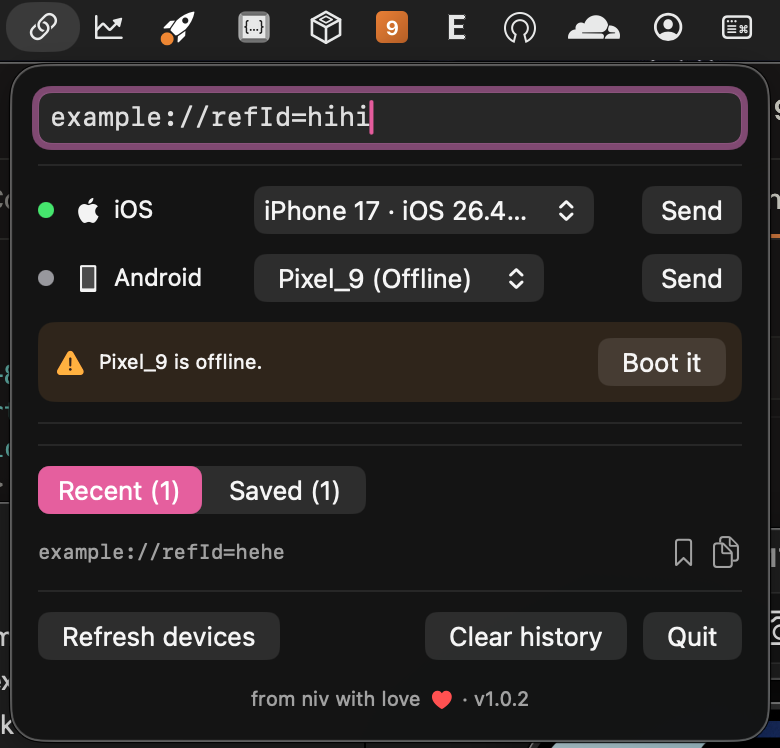
mlink lives in your menu bar. Paste a link like example://refId=…, pick a target, hit Send — no terminal, no typing bundle IDs.
macOS 26.2+ · Apple Silicon · ZIP 257 KB
Prefer a disk image? Download the .dmg (542 KB)
iOS simulators
Lists every simulator, shows boot state, and boots shutdown devices automatically before sending.
Physical iPhones
Detects USB / Wi-Fi devices and matches the link scheme to the right handler app — or pick manually.
Android, both kinds
Running devices and offline emulator AVDs in one picker — offline emulators boot on demand.
Paste-proof input
Stray spaces and line breaks from chat apps are stripped on paste, so links always send clean.
Recent & saved
Sent links land in Recents; bookmark the ones you reuse and they persist across launches.
Missing-tool hints
No adb, simctl, or devicectl? The app tells you exactly what to install instead of failing silently.
Install in a minute
- Download
mlink-1.0.4-mac.zip(unzip it) ormlink-1.0.4-mac.dmg(open it). - Drag
mlink.appinto/Applicationsand launch it — it lives in the menu bar. - On first launch, right-click the app and choose Open (this build is ad-hoc signed, so a single confirmation is needed). If macOS reports the app as damaged, run:
xattr -cr /Applications/mlink.app